
Upcoming Project Teasers and Function Update
- Doug Bates

- Dec 16, 2022
- 3 min read

Since LAMBDA and LET and AFE came out I've enjoyed spending time developing new functions. For years I had been stretching the limits of what I could do with names and tables, with selective forays into VBA. This new custom function platform was made for people like me who were not fully served by either Excel alone or Excel with VBA. I've since created dozens of functions including some that I think are pretty cool tools.
But what's the point? Tools are not an end in themselves, even though my shopping behavior (and blog posts) might suggest so. I buy tools with at least a vague vision of their use. Sometimes the tool finds immediate use, other times it sits on the bench, just in case.
Shopping for tools can lead to invention, when the right one is not to be found, or requires a jig to fit the purpose. Building tools feels purposeful, but they're still just tools. When I find myself following a white rabbit, I snap back to the vision of the result, which alone will justify the many unsung tools it employs. Better to be under construction for as long as it takes than to succumb to technological self-satisfaction.
Tools plus skills result in capability, capability plus purposeful action result in achievement. xlegant is about concrete, relevant application of tools by using them intentionally towards a purpose, with integrity, transparency and elegance. So please bear with me when I focus on basic tools and skills, and catch the vision of where they can lead you.
Upcoming Projects

Now that I have extended date functions and can use arrays efficiently, I will revisit and improve the Family History Timeline that I introduced in April. To recap, it's designed to give a graphical representation of the lifespan of individuals against a customizable time scale and a background of historical events. The data is presumed to come from a genealogical database, with a mix of text and numeric dates. The calculations to identify bloodlines and dates and conditional formats are extensive. I expect that several of my newest tools and skills will be useful in pursuing a robust and elegant product.

Another project I'm consulting on is a Cumulative Schedule Performance Measure. Schedule performance is used in many industries, expressed as the percent of deliveries received on-time within a tolerance window. When each order is uniquely identified, the calculation is simple, by comparing receipt date and quantity to the order. Some companies use a "blanket order" or "scheduling agreement," with a single order number for many deliveries, which receipts fulfill cumulatively. In this scenario, a different calculation is required to compare cumulative receipts to cumulative orders. A reliable and useful measure has been elusive for years, and a new approach is needed.

A third project still in early conception is a nutrition tool. Excel has a food data type that has the potential to enter foods and amounts and return nutrition facts. This will be useful to manage a diet, especially for those who don't follow the FDA guidelines on recommended daily allowances. Excel will enable definition of personal targets, tracking, and finding which foods help or hurt.
These projects and others will appear in the coming weeks and months. If you have any needs or suggestions, please leave a comment or contact me.
Now, for today I have some more interesting LAMBDA functions, and a fix and upgrade of the d.calendar function, which is part of the date function package presented last week.
New Functions
m.rowsum: cumulative sum or net sum of a vertical array
cumulative sum
The cumulative sum is the sum of values up to and including the current row, commonly used when working with ordered data such as date-sorted values. It requires only sumarray input, the column of data to be summed.
The function uses BYROW to get around the nested array error, and SUM(OFFSET per row with the height argument to identify the dynamic range of cells to SUM. The height is the row index up to the row above the input array.
net sum
This is the criteria-based cumulative sum, or net sum from one criterion to the next. It requires two arguments in addition to sumarray. The first is the criteria_range which corresponds to the sum data, the second is the range of criteria values to match to the first. SUMIFS then adds the rows from sumarray that correspond to the criteria_range rows that meet the two conditions, "> previous criterion" and "<= current criterion." If criteria is a single value, it sums sumarray up to that value.

Below inputs are fixed amounts for a series of Mondays and Thursdays. When only sumarray is given, the output is cumulative sum. When criteria_range and criteria are given, the output is the net sum per bucket. When criteria is a single value, the cumulative sum up to that value is output.

m.rowdelta: delta of each row from the previous row of a vertical array
Another common need with ordered arrays is to know the increment or delta of each row. Like m.rowsum, this function uses BYROW and OFFSET, but in this case using the row argument instead of the height argument.


Here is a hybrid period profile (see d.periodprofile from last week) with m.rowdelta returning the number of days in each period.
[zero] = blank: first output row = first input row.
[zero] = non-zero: first output row = 0
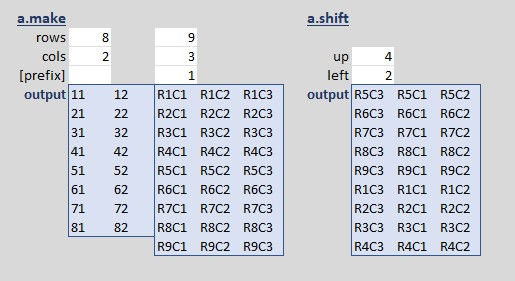
a.make: output array of row and column indexes
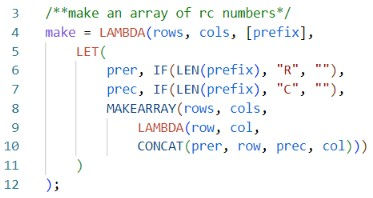
Output shown below with a.shift
a.shift: shift an array up and/or left without changing the size
This uses several of the new array functions recently released.

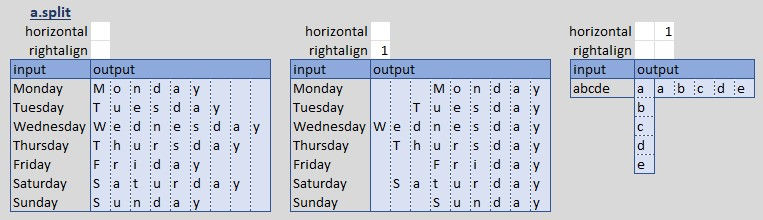
a.split: output array of the individual characters in a cell or array
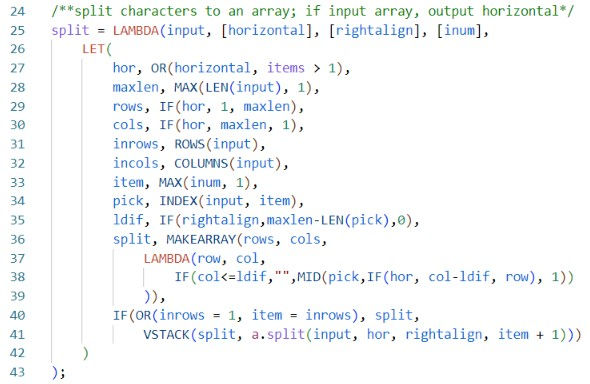
When input is an array, output is horizontal split, left or right-aligned. When input is a cell or string, default output is vertical split, option is horizontal split.
f.foundin: Boolean true if a lookup value is found in an array
A small but useful shortcut.

Updated d.calendar
New features, renamed and reordered arguments, improved code, and bug fix.
bug fix
The flaw appears when the week and the month both start on Sunday. In that case, the first of the month is in the second week instead of the first, so there is a full week row of the previous month. This is due to the code phrase that returns the offset that puts the first of the month in the proper weekday column.
The top left date of the array is offset from the first of the month based on the selected starting weekday, Sunday or Monday. With this fix, d.calendar, to be consistent with WEEKDAY, uses startwd 1 for Sunday start, 2 for Monday start. These WEEKDAY types 1 and 2 count weekdays from 1 to 7; to get the correct offset then, subtract 1 from the weekday number:
offset, WEEKDAY(from, startwd)-1,
Thus, if the first-of-month is Friday and the week starts Sunday, WEEKDAY(from,1)-1=5; Friday - 5 = Sunday. If the first-of-month is Friday and the week starts Monday, WEEKDAY(from,2)-1=4; Friday - 4 = Monday, etc.
Another way to handle this is to use MOD with return_type 2 for Sunday start and 3 for Monday start: MOD(WEEKDAY(from,startwd+1), 7). This returns 0 to 6, eliminating the "subtract 1" clause. Either way is simple, the one I chose is more standard by matching the 1,2 selection between d.calendar and WEEKDAY.
holidays
Now that I have a calendar function and a holiday function that can both return text, why not annotate the calendar with holiday names? This is easy. In building the grid of days, look up the dates in that year's holidays list, return the holiday name from column 2 of the rules table, and concatenate it to the day number. A new argument [holidays] enables the option.
Here griddates is the "look-for array" of date values, before conversion to text; d.holidays is the "look-in array;" and d.holirules column 2 is the "return array." gridhols, XLOOKUP(griddates,d.holidays(YEAR(from)),d.holirules(,2),""), This phrase returns the holiday name for any date in griddates that matches a holiday, which is then concatenated to the day if it's within the month and if the holidays argument if non-zero.
& IF(notmonth,"", IF(holidays," " & gridhols,""))
See the recap below for example output. This requires formatting to look decent, for example, by widening columns, wrapping text, reducing font size or some combination. To reduce font size of the holiday text but not the day text, hit F2 to edit the cell, select only the text to change, and set the size. As an unprinted sheet reference, even if you can't read the whole name, it still serves the purpose.
single month format for print
When you look at a calendar the first thing you need to know is what year and month it is. For a soft perpetual calendar this is done with side columns, or via cell format. d.calendar offers two format options, one for the first of the month and the other for all other days. The default first-of-month format "d mmm y" gives the needed context while other days "d" keeps the grid unbusy.
Month Heading
For printing, however, we should approximate the standard calendar format: one month per page, blank cells outside the month, day number only inside (or with holiday), with the month and year above the grid. The function can at least return the desired data formats, ready for manual cell formatting.
To meet this design, the month and year heading would ideally be a string centered on the page, but we'll have to work within the output array structure. We can VSTACK the heading, but it must have the same seven columns. The heading then will reside in one column or can be split to fill the seven. This became a pick list of four options, in addition to blank = no heading. The first three options are variations of "m y". Option four concatenates the three-letter month abbreviation with the four-digit year and splits the seven characters across the seven columns. Admittedly none of these options is very pretty to begin with, but it gives you all you need so you don't have to add anything before formatting.
Rows by Month Most months take five rows; months that start on the last one or two days of the week take six; a non-leap February that starts on the first day of the week takes four. I started this with a sanity table of observed patterns. From that I could see that the days in the month plus the offset is the total number of cells in the month; divided by seven and rounded up is the rows.
gridweeks, ROUNDUP((EDATE(from,1)-from+offset)/7,0),
Blanking Dates The conditions to blank dates are first that the user invokes it by entering one of the [formatmonth] options, and second that the date is outside the selected month. These are two Boolean conditions that must both be true, so we could use AND, but logical functions are not friendly to arrays, so instead we can use math: notmonth, onemonth*(MONTH(days)<>MONTH(from)), This is then inserted as another nested IF in the TEXT formatting phrase of the grid builder: IF(notmonth, ";" ... This format hides numbers. A similar condition is added to the holidays phrase to blank them as well.
recap and code
Here are six cases to illustrate the two new arguments, holidays and formatmonth.

default is unchanged except number of rows adjusts to cover one month
with holidays
month format 1: mm yy, header added and outer dates blanked
month format 2: mmm yy
month format 3: mmmm yyyy
month format 4: mmmyyyy, using a.split, see above
Print preparation

Working with values only, in a few minutes a printable format can be done and replicated for other months.

d.calendar code download: copy/paste to module d.
bonus spinoff, d.calstack: stack monthly calendars
A spinoff of d.calendar, this returns monthly calendars stacked up in a single array. Default is the twelve months of the current year. Due to recursion it outputs one extra row at the bottom, therefore an internal function is used to generate the array, and the output function drops the last row.


Comments